jAmpler
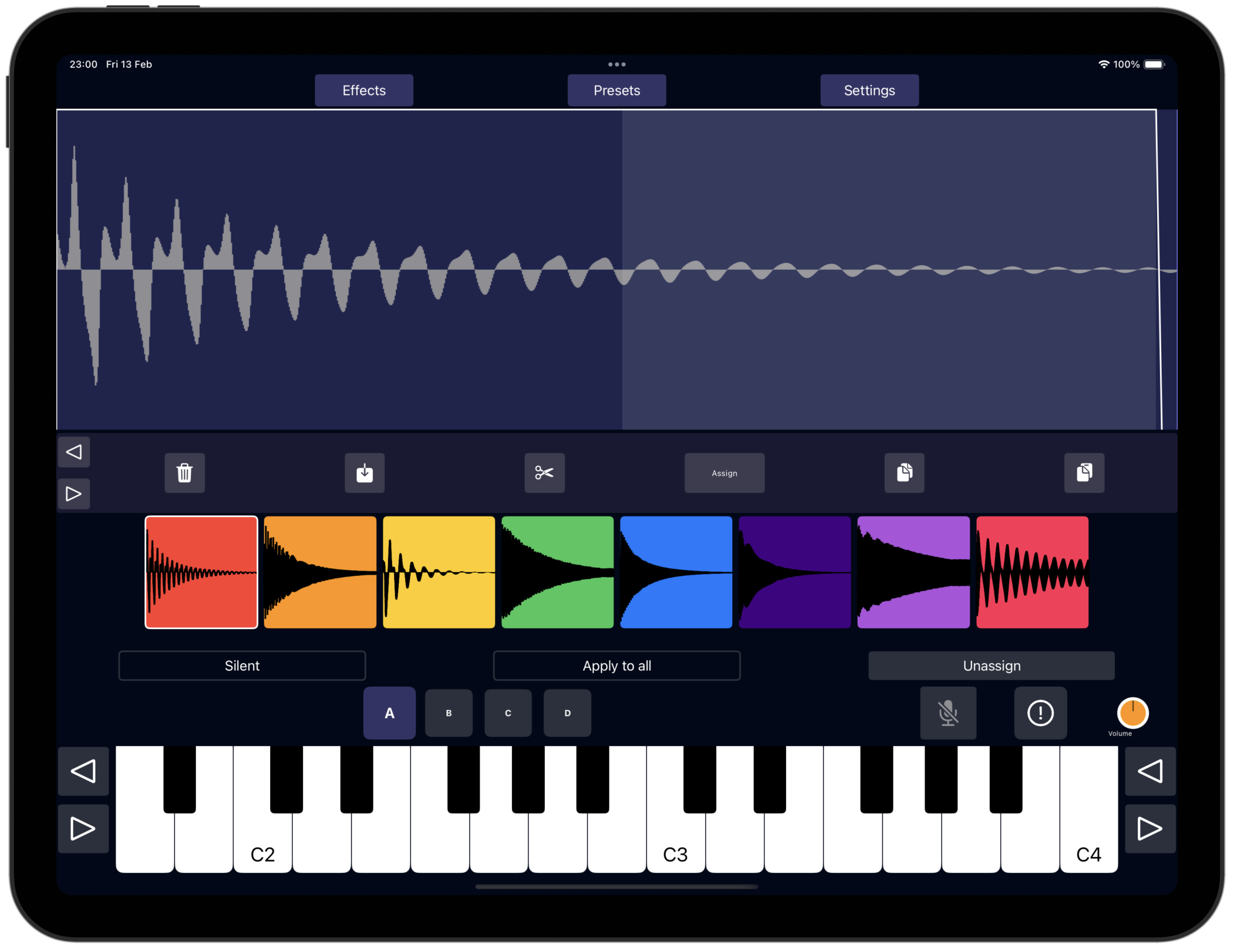
jAmpler is a sample-based instrument plugin for iOS and macOS, designed as an Audio Unit v3 (AUv3) instrument. It enables you to record, import, assign, and manipulate samples with a rich set of controls and global effects — all accessible in a compact, intuitive interface.
Features
- 4 banks, each with 8 samples.
- Each sample is represented by a unique color.
- Record samples directly using your device’s built-in microphone.
- Import audio files to use as samples.
- Assign samples to keyboard keys using their color codes.
- Detailed controls per sample:
- Copy, paste, and trim samples.
- ADSR envelope (Attack, Decay, Sustain, Release).
- Crossfade and crossfade overlap for seamless looping.
- Octave shifting and drive/distortion.
- Filter and pitch shift options.
- Granular synthesis controls (wet, density, size, spray, stereo spread, window shape).
- Global effects:
- Velocity Controlled Filter (VCF).
- Low Frequency Oscillator (LFO).
- Compressor.
- Distortion.
- Equalizer.
- Chorus.
- Cabinet.
- Reverb.
- Adjustable velocity curve and keyboard temperament.
Getting Started
Banks and Samples
- There are four banks, each containing eight samples.
- Samples are activated by pressing the corresponding colored button.
- Long-press an empty sample button to record a new sample using the microphone.
- Long-press a non-empty sample button to play the sample (if Silent mode is off).
- Each sample button’s color helps you identify and assign samples easily.
Recording and Importing Samples
- To record a sample:
Long-press an empty sample button and speak or play into your device’s microphone. - To import a sample:
Use the Import Wave function to load audio files as samples.
Assigning Samples to Keyboard Keys
- Use the keyboard to trigger notes or to assign/unassign samples in
(Un)Assignmode. - Samples are assigned based on their color codes.
- Unassigned keys (gray) will trigger the closest assigned sample.
- Darker colors represent samples from other banks.
Sample Controls
| Control | Description |
|---|---|
| Copy / Paste | Copy or paste sample waves and their controls. |
| Trim | Edit the start and end points of the sample wave. |
| Assign | Assign the sample to keyboard keys using color codes. |
| Attack / Decay / Sustain / Release (ADSR) | Shape the amplitude envelope of the sample. |
| Crossfade | Enable seamless looping of the sample. |
| Crossfade Overlap | Adjust overlap length for crossfade loops. |
| Octave | Shift the sample pitch by octaves. |
| Drive | Add distortion drive to the sample. |
| Filter | Apply a second-order biquad filter to the sample. |
| Pitch Shift (or not) | Enable or disable pitch shifting of the sample. |
| Granular Wet | Control amount of granular synthesis effect. |
| Granular Density | Adjust grain density in granular engine. |
| Granular Size | Set grain size. |
| Granular Spray | Randomize grain starting position for texture. |
| Granular Stereo Spread | Control stereo panning of grains. |
| Granular Window Shape | Set amplitude envelope shape of grains. |
If
Apply to all is activated, the control changes will be applied to all the samples. Otherwise only the active sample is affected.Global Effects
| Effect | Description |
|---|---|
| Velocity Controlled Filter (VCF) | Filter controlled by note velocity with adjustable cutoff and drive. |
| Low Frequency Oscillator (LFO) | Modulates amplitude or pitch with adjustable frequency, delay, and waveform. |
| Compressor | Controls dynamics by reducing signal peaks with threshold, attack, ratio, and gain. |
| Distortion | Adds harmonic distortion with adjustable amount and tone shaping. |
| Equalizer | Five-band EQ to boost or cut frequencies (80Hz, 240Hz, 750Hz, 2200Hz, 6600Hz). |
| Chorus | Creates a doubling/modulation effect with rate, depth, and mix control. |
| Cabinet | Simulates cabinet impulse response with filters and modulation controls. |
| Reverb | Simulates room reverberation with size, tone, delay, and mix controls. |
Import options
- Load a Yamaha DX7 sysex file. Samples will be generated automatically for each of the 32 patches in the DX7 sysex soundbank.
- Load sfz files. In order to successfully load a sfz file, you should first compress the whole folder with all the samples and .sfz files into a .zip file. Next, you can import this .zip file in jAmpler.
- Load sf2 SoundFont files. Samples will be generated automatically for each of the presets in the SoundFont file.
Additional Settings
- Velocity Curve: Adjust how incoming MIDI velocity affects output volume.
- Temperament: Choose tuning and temperament settings, including standard 440Hz.
- Panic Button: Instantly silence all sounds.
- Silent Mode: When enabled, samples activate silently (without playback on activation).
- Mic On/Off: When the mic icon is on, the microphone input is mixed with the output signal.
Tips and Notes
- Use the wave view to visualize and edit the active sample’s waveform and ADSR envelope.
- Long-pressing sample buttons gives quick access to recording or playback depending on sample state.
- Color coding helps you keep track of sample assignments across banks.
- Experiment with granular parameters to create rich, textured sounds.
- Use the
(Un)Assignmode to customize your keyboard layout and live performance setup.
Demos
Privacy policy
jAmpler does not collect any personal data.